In which I spend hours transferring files to ensure our embarrassing moments are safe forever.
A few weeks ago, I had dinner with my parents, my sister, brother-in-law and niece. It was the day before Halloween and we decided that we’d have the kids dress up and we’d watch old family videos. What started as a fun, laid-back plan quickly took a turn to Stresstown and resulted in me deciding that digitizing our collection of Hi-8 tapes needed to be reprioritized from “Would be Nice Someday” to “Must Complete ASAP.” After all, you know I love a good project.
First, a bit of background: I LOVE watching our home movies. My parents (and older sister!) did an incredible job of documenting our lives with photos and videos. We have videos of Christmases, yes, but also random Tuesday nights where we’re outside looking at hot air balloons. The tapes are meticulously labeled with dates, timestamps, and amusing descriptions of the contents – “Maddy rolls over and spits up” is one that comes to mind. At one point, in high school, I started the project of going through and making copies of all of the tapes (they look a little something like this) on DVDs for ease of watching, but I quickly got bored and stopped. As a result, we generally just play back the tapes directly from the camcorder.
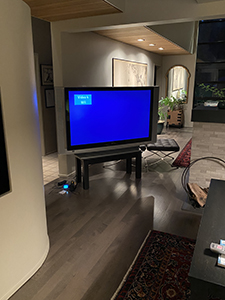
However, this particular Friday night, I went to hook up the video camera and discovered that the AV hookup my dad had set up previously no longer functioned with the new television. This prompted much discussion, inspection of the new TV, and finally the decision that the massive rear-projection unit (Magnolia Hi-Fi’s finest, as I deemed it) needed to be temporarily relocated from the basement to the living room. It was quite a production, but (most of) the walls emerged unscathed, and there was only minimal swearing. Successful, overall, but not really a sustainable solution. We had a wonderful time watching the old videos (particularly hilarious on the giant screen), and it was clear that we needed a way to continue to watch them in the future without having to worry about how. So, merry Christmas, Dad – I digitized our home videos.
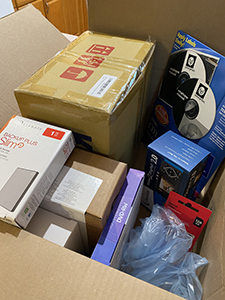
First, I had to assemble my supplies. I knew that I wanted to create both a digital library of the videos as well as replicate the tapes in DVD format. I ended up purchasing the following:
- Video to digital converter
- 128GB USB drive and 1TB external hard drive
- External DVD drive (our Surface doesn’t have a disk drive)
- DVDs (not linking because the AmazonBasics ones were trash, more on that later) and disc labels, as well as a label applicator
- A CD binder – I originally got jewel cases but realized they would take up too much room
Once I had all of my supplies, the task began. There isn’t really (as far as I can tell) a “shortcut” way to do this transfer. Essentially, you play through the tapes on the camcorder, while recording onto the USB drive via the converter. If you’ve ever made a mixtape from the radio (I just lost anyone under about 30), the same principle applies. If you fast-forward through the tape, the fast-forwarded version is what gets recorded, so it’s a slow process. I typically would set up a tape to start playing in the morning and just check on it periodically. The converter I got had an option to automatically stop recording after a certain amount of time, but since I was never really sure how long the tapes were, I just chose to manually end the recording. Worst-case, I ended up with blank space at the end of the recording – sometimes, if I was worried about the file fitting onto the DVD, I cut it down in Adobe Premiere Rush, sometimes I just left it.
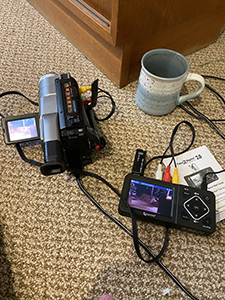
I repeated the recording process over and over again, transferring the files from the USB to the external hard drive every three or four tapes, just to be safe. I watched back bits of the videos on my computer, to verify that the labels on the tapes were correct and to make sure that nothing had gone wrong in the video transfer process. I did find that the converter recorded some fairly choppy video – the instructions say not to worry if it looks like it’s doing this because it will play back fine. I didn’t necessarily find that to be the case, but ultimately it wasn’t worth trying to make it perfect. I chalked it up to some of the tapes being slightly damaged – not surprising, since many of them were 20-30 years old.
Once I had the files digitally safe, I set about making hard copies that could be played without the camcorder. I chose to make DVDs, but I skipped the fancy steps of menus, titles, etc. because I knew that I wouldn’t be able to do it in a reasonable timeframe. The Microsoft Surface that we have doesn’t have a ton of processing power, and the DVDs that I had weren’t large enough to handle Rush files of any significant length. I copied the files from the hard drive and burned the DVDs, not without a large amount of difficulty. Turns out that the AmazonBasics DVDs that I had purchased were garbage, despite their high star rating. About two out of three times, the disk would fail to burn, resulting in a corrupted and unusable DVD. For a while, I thought it was the drive that I was using, so I replaced it (the one I linked above is the new one, which definitely is higher quality than my first attempt). That seemed to help, but I was still seeing failures about 50% of the time. I thought I had found a workaround by rebooting the computer before every burn attempt, but I think that was mostly a fluke. I had just about run out of DVDs (and patience) when my mom cleaned out a cabinet at her house and found a huge supply of DVDs from back in the day. I successfully burned three in quick succession, with no issues. Furious, I went back and read the reviews of the AmazonBasics disks and found that I was not alone in my struggles. Those DVDs are trash. Sigh.
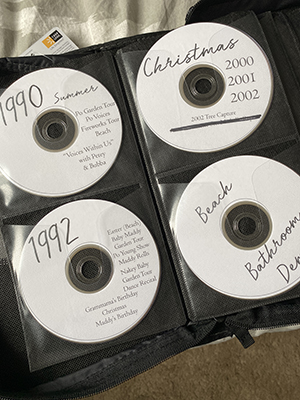
The “fanciest” part of the project, for me, was the labels. I decided to get a little extra and make consistent Photoshop versions, rather than hand-writing all of the labels. I had great fun designing, printing, peeling and sticking all of the labels. At first, I thought that the label applicator that I had purchased was a huge waste of time and money, but I was just using it wrong. That thing is a game-changer. I want to label ALL the CDs/DVDs. Very satisfying.
Above all else, I cannot properly express how much fun this project was. I am, as we know, a nostalgic lady. I have always loved these home videos, even when I was a kid. I cringe (like, full-body, bury-my-head-in-my-hands cringe) at some of the ones that I made – there are literal tapes just of me testing out the “special effects” on the camera – but ultimately I appreciate that even these are capturing moments in time and preserving them in a way that photos alone cannot. I love getting to see my sister, age 10, hop a fence with my mom and try to ride horses. I giggle at my other sister, age four (ish), quoting Grease – “Tell me about it, stud.” I was surprised and delighted to watch a clip of myself setting up an “interview” and realize that I share a variety of minute expressions and movements with my 5-year-old niece. I am so thankful to have these records of history preserved, and going through the process of backing them up made me even more determined to carry on the tradition. In 30 years, I want to be able to look back on videos of baby E squawking at the ceiling fan and spitting up on me as we play airplane and show her how little she once was. Plus, moustache-sporting Rick dancing to David Bowie needs to be immortalized on video forever, in my opinion.
 Hickmans at Home